
Easy Invoice & Estimates Maker
Lefage, LLCBusiness
4.2105.00 Reviews
- Version
- 9.4.1
- Installs
- 50.00K
- Age Rating
- Everyone
Screenshots
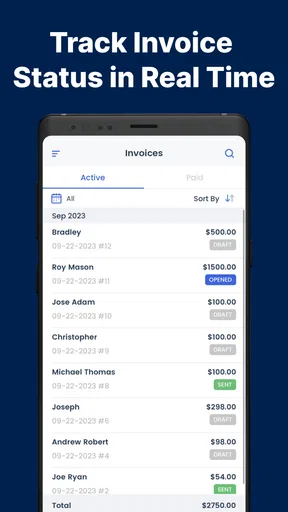
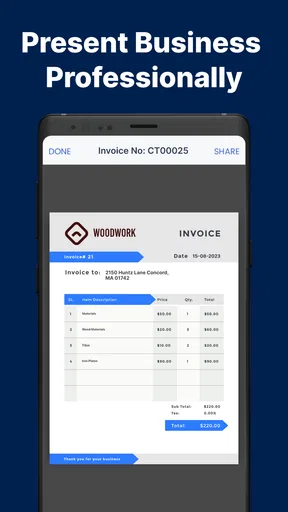
Our Review of Easy Invoice & Estimates Maker
 Analysis by Appyee
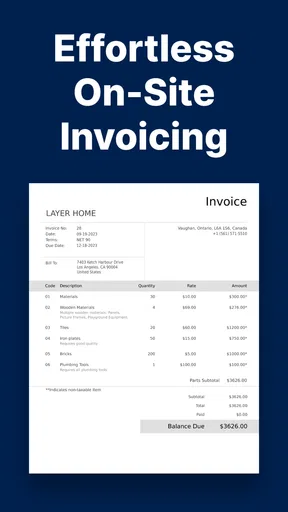
When I need to turn a finished job into something a client can understand and pay, the difficult part is often not the work itself. It is gathering the customer details, describing what was done, adding the right totals, and producing a document that looks trustworthy before the moment gets away from me. Easy Invoice & Estimates Maker is built for that exact gap: a business app from Lefage, LLC that helps create PDF invoices and estimates from a phone.
I found its appeal in the short distance between an idea and a usable document. Instead of opening a general word processor, searching for a template, and manually arranging totals, I could start from an invoice layout and work through the information in a more focused way. It is free to install, rated for Everyone, and available for devices running Android 7.0 or later. The app has reached over 50 thousand installs, with a 4.2 average from around 975 ratings, so it has a useful track record without pretending to be a full accounting platform.
From completed job to a document ready to send
I’d use this section to focus on the handoff after the work is done: turning a clear record of the job into a document the customer can review without extra explanation. A quick check of the recipient, wording, and amount helps make that handoff feel deliberate, and it sets up the next question: how to keep the process reliable when more than one person is involved.
The starting condition matters more than the template
The app makes the most sense when the business process is simple but time-sensitive. Think of a freelance designer who has just delivered a logo, a cleaner finishing a visit, a repair professional leaving a customer’s property, or a small consultant wrapping up a short assignment. In each case, the person already knows what was supplied and what should be charged. The problem is turning that knowledge into a clear estimate or invoice while the details are still fresh.
I would not begin by treating it as a replacement for bookkeeping. I would begin with a small piece of work that needs a professional-looking document quickly. That distinction keeps expectations realistic. This is a document-making tool in the Business category, not something I would choose as the central system for payroll, inventory, tax reporting, or complex financial control.
Before opening a new document, I would gather the customer’s name and contact details, the service description, the agreed amount, and any terms that need to be visible. Doing that first is a surprisingly useful habit. A mobile invoice app can make typing easy, but it cannot correct a vague service description or an incorrect recipient. The best result still depends on the information I bring into the workflow.
Building an estimate before the work begins
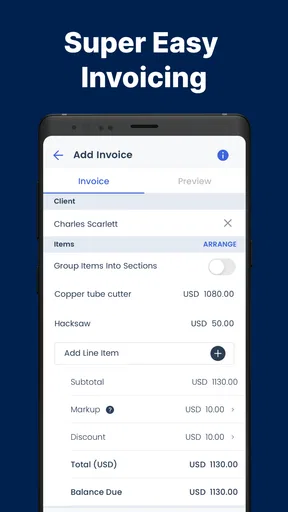
For a new customer, I would use the estimate stage to make the scope readable before discussing the final invoice. I can separate the work into understandable line items rather than sending a single unexplained amount. That is especially useful when a customer needs to approve a job, compare options, or forward the proposal to someone else.
My practical tip is to write each item as if another person will see it without hearing the conversation behind it. “Replace damaged fitting” is more useful than “repair,” while “design revisions” is more useful than a private shorthand. A template can improve presentation, but the wording is what prevents later disagreement. The app helps me package the information; it does not make unclear work clear by itself.
Estimates are also a good place to catch scope creep early. If I notice that the document needs many exceptions, conditional charges, or several alternative packages, I would pause before sending it. A straightforward estimate can be comfortable in this app, while a complicated proposal may be better handled in a dedicated quoting or project-management service where revisions and approvals are easier to track.
Moving from approved work to an invoice
Once the job is complete, the handoff from estimate to invoice is where a mobile workflow can save the most effort. I would keep the customer identity and service wording consistent, then adjust the document so it reflects what was actually delivered. This is more reliable than starting from a blank page after the work is finished, because the original estimate acts as a memory aid.
There is an important trade-off here. Reusing the same structure reduces typing and makes the documents look connected, but it can also encourage me to copy details without checking them. I would always review quantities, descriptions, and totals before creating the final PDF. A fast invoice is only useful if it represents the completed job accurately.
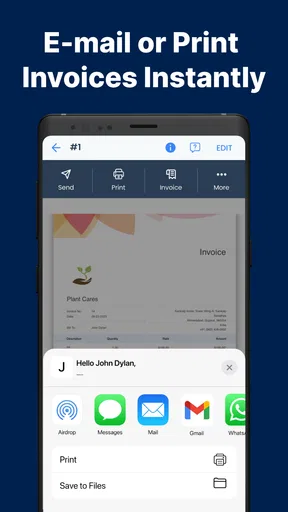
The PDF output is valuable at this point because it gives the customer a fixed document rather than an editable draft. I can review the finished page, confirm that the business and customer information appear as intended, and then pass it along through the communication method I normally use. The app’s role ends at producing the document; the actual delivery and payment follow-up still belong to my wider business routine.
Why the PDF handoff works well
A PDF is a practical middle ground for small businesses. It looks more deliberate than a message containing a price, and it avoids asking the recipient to open a special app just to read the charge. When I send an invoice to a customer, the document can be saved, forwarded, or printed without changing the layout I prepared.
I would still inspect the PDF before sending it, especially on a small phone screen. A line that looked fine while editing may be less clear in the final document, and a long description can affect how the page reads. My workflow would be: create the document, preview it, check the recipient and amount, then send it. That final pause is more important than shaving another few seconds from the creation step.
Another useful handoff is internal. If I work with a partner or assistant, the PDF can serve as a common reference for what was charged. It is not a substitute for a shared accounting ledger, but it can reduce confusion when someone else needs to know what the customer received. For a one-person business, that same document can become a simple record to store alongside receipts and messages.
What the finished result feels like
The strongest outcome is not merely a prettier invoice. It is a repeatable routine: finish the work, open a familiar template, enter the customer and line items, review the PDF, and send it while the job is still recent. That routine lowers the mental friction that often causes independent workers to postpone invoicing.
In an everyday scenario, imagine a mobile repair worker completing an afternoon visit. Instead of waiting until evening to reconstruct the service from memory, the worker can prepare an estimate before starting, update the document after the repair, and produce the invoice while still outside the customer’s location. The customer receives a clearer record, and the worker avoids carrying several loose notes into the next day.
For a freelancer, the benefit is slightly different. The app can make a small project feel more organized when the rest of the business is being run from a phone. For a sole trader who sends only occasional invoices, the templates may be more approachable than setting up a large accounting suite. For a growing team, however, the value depends on whether the app fits around existing records rather than becoming another isolated place to maintain information.
Where it compares well with familiar alternatives
The usual alternative is a word processor or spreadsheet. Those tools offer flexibility, but I have to build the layout, protect the formulas, and remember how to make every new document consistent. A focused invoice app is less open-ended, yet that limitation is useful when the goal is to finish a professional document rather than design one.
Another alternative is a full accounting service. That route is stronger when I need customer histories, expense tracking, reconciliation, tax workflows, recurring billing, or collaboration across a team. Easy Invoice & Estimates Maker is more attractive when the immediate need is creating a PDF invoice or estimate without adopting a complete financial system.
Paper forms remain workable for some local businesses, particularly when customers pay in person. The app becomes more useful when a document must be sent remotely, kept readable, or shared with someone who was not present at the job. It also gives a more consistent starting point than writing amounts by hand, although I still need a separate habit for tracking whether an invoice was paid.
Small workflow choices that improve the experience
My first recommendation is to prepare a short personal vocabulary for common services. Reusing clear descriptions speeds up entry while keeping invoices understandable. I would avoid copying an old document without checking the customer name, because the convenience of a template can create an embarrassing mistake if the previous recipient remains in place.
Second, I would separate the moment of creation from the moment of sending. Creating the PDF immediately keeps the facts fresh, but sending it after a deliberate review gives me a chance to catch a wrong amount or incomplete description. This two-step habit uses the app’s speed without allowing speed to become carelessness.
Third, I would decide where the final PDFs belong before using the app regularly. A phone can create documents quickly, but finding them later is a separate problem. Keeping a consistent naming approach and storage routine makes the invoices more useful when a customer asks for a copy. The app can produce the document; my filing system determines whether it remains useful months later.
Fourth, I would use estimates as communication tools rather than merely price slips. If a job has two distinct stages, I would describe those stages plainly and make the customer’s expected outcome visible. That can reduce back-and-forth before approval. If the work changes, I would create an updated document instead of relying on a verbal correction that may be forgotten.
Where the flow breaks down
The clean workflow becomes less comfortable when the business needs more than document generation. If I need automatic payment status, detailed customer accounts, recurring billing, inventory deductions, or a connected tax process, I would look at accounting software instead. The app may still be useful for quick PDFs, but it should not be forced to carry responsibilities better handled elsewhere.
There is also a human limitation: mobile entry is not ideal for a long, complex invoice. A phone works well for a handful of services and a customer who is already known. It becomes tiring when I must enter many line items, revise several sections, or compare information from multiple sources. In that situation, a desktop-oriented system or a spreadsheet may be faster, even if the final document looks less polished without extra setup.
Cost is another point to consider. The app is free to install, while in-app purchases range from $5.49 to $499.99 per item. That wide range means I would check the purchase screen carefully before committing to anything, particularly if I only send occasional invoices. A free starting point is helpful, but a business app should be judged by the value of the specific tools I actually need, not by the fact that installation costs nothing.
Users on older devices should also pay attention to compatibility. The minimum requirement is Android 7.0, which covers many still-used phones but not every device. I would confirm that before building my invoicing routine around the app. The current version is 9.4.1, so keeping the app updated is a sensible way to avoid using an outdated release when preparing customer documents.
Who should use it, and who should choose something else
I would recommend it to freelancers, independent tradespeople, home-service providers, and small operators who want a quicker path from completed work to a presentable PDF. It is particularly suitable for people who currently send informal price messages or create every invoice manually. The template-based approach can bring consistency without requiring a large software setup.
I would be more cautious if several people need to edit the same records, if the business has a high volume of invoices, or if financial reporting is central to the daily operation. In those cases, a connected accounting platform is likely the better foundation. I would also skip it as my primary tool if I need a detailed audit trail or a complete payment-management process rather than a document creator.
The age rating of Everyone makes the app broadly approachable, but that does not mean every business workflow will feel equally comfortable. A beginner can understand the basic purpose quickly, while an experienced business owner may find the simplicity either refreshing or restrictive depending on how much structure the company already requires.
My final take after following the whole process
Easy Invoice & Estimates Maker succeeds when I treat it as a focused bridge between work completed and information delivered. It helps turn customer details, service descriptions, and amounts into a PDF that is easier to review and share than an improvised message. The best part is the reduction in small administrative decisions: I can begin with an invoice template instead of designing the page from scratch.
Its limitations are just as important. It does not remove the need to check every document, maintain records, follow up on payment, or choose a proper accounting system when the business becomes more complex. The premium purchase range also deserves attention before regular use. For a small operation with straightforward estimates and invoices, though, the free entry point makes it reasonable to test.
I would recommend trying it with one complete job rather than judging it from the installation screen. Start with a clear estimate, update it carefully after delivery, preview the PDF, and follow your normal sending and filing routine. If that sequence feels easier than your current method, the app has earned a place in your toolkit. If the handoffs still require several outside systems, that is a sign you need broader business software instead.
For my use, the app’s value is simple and practical: it makes the professional document the easy part of the job. Use it when speed, clarity, and a clean PDF matter more than deep accounting controls. That is a modest promise, but for someone who is tired of postponing invoices, it can make a real difference.
Verdict
Strengths of Easy Invoice & Estimates Maker
- Create professional invoices and estimates from your phone.
- Useful templates help speed up recurring billing tasks.
- Track payment status to keep outstanding invoices organized.
- Add business details, taxes, discounts, and customer information.
- Suitable for freelancers and small businesses with simple needs.
Limitations of Easy Invoice & Estimates Maker
- Advanced accounting and inventory features may be limited.
- Some useful tools may require a paid subscription.
- Customization options can feel restrictive for complex invoices.
- Manual data entry may become tedious with many customers.
- Cloud backup and syncing policies should be checked before relying on them.
Similar Picks in This Category
View All
LinkedIn: Community & Network
LinkedIn3.8

Zoom Workplace
zoom.com4.1

Microsoft Teams
Microsoft Corporation4.6

Meta Business Suite
Meta Platforms, Inc.4.6

Webex Meetings
Cisco Systems, Inc.4.5

TeamViewer Remote Control
TeamViewer4.4
Frequently Asked Questions
What is Easy Invoice & Estimates Maker used for?
Easy Invoice & Estimates Maker is designed for freelancers, independent contractors, and small businesses that need to create professional invoices and estimates from a phone or tablet. During testing, the app was useful for preparing documents quickly, adding customer and company details, listing products or services, applying taxes or discounts, and keeping billing information organized without relying on complicated accounting software.
Can I customize invoices and estimates before sending them?
Yes, the app generally allows users to personalize invoices and estimates with business information, customer details, item descriptions, quantities, prices, taxes, discounts, notes, and payment terms. Depending on the version and available settings, you may also be able to include a logo or adjust the document appearance. It is worth reviewing the final preview carefully before sharing it with a client.
How can I send or share documents created in the app?
After creating an invoice or estimate, users can typically save it and share it through common options such as email, messaging applications, cloud storage, or other installed services. Documents are commonly generated in a professional, printable format, making them practical for clients who prefer digital records. Always check the recipient, totals, and payment information before sending.
Does Easy Invoice & Estimates Maker work offline?
Many basic tasks, such as entering customer information, preparing line items, and drafting invoices, may work without a constant internet connection, which is convenient when working at a job site or traveling. However, features involving synchronization, backups, online payments, advertisements, or sharing may require connectivity. Offline availability can vary by device, operating system, and app version.
Is Easy Invoice & Estimates Maker free to use?
The app may offer free access to essential invoicing and estimate features, but some functions can be limited by advertisements, document quotas, templates, exports, branding, cloud storage, or premium subscriptions. Before downloading or relying on it for business use, review the current pricing details in the Google Play Store or Apple App Store and check whether recurring charges apply.
